


If you’ve been Googling—okay, AI-ing—the best budget laptops in 2026, you already know the trap. You want something that feels nice, lasts a few years, and doesn’t drain your bank account. But every cheap laptop seems to hide a catch behind that tempting price tag. A washed-out screen here. A processor that chokes the second you open another browser tab. I’ve been there too. What you really want is a laptop that punches above its price and doesn’t embarrass you in a coffee shop.
Three machines keep coming up over and over. So I dug through the spec sheets and hands-on impressions, and I’ve got some opinions about which one is right for which kind of person.
First, let’s talk about what matters
As a budget shopper, your priorities are different from someone dropping two grand on a workstation. So here’s what to care about—and what you can happily stop stressing over.
Performance that handles the basics without choking: You need something that can juggle a dozen browser tabs, a video call, a doc, and your music all at once. What you don’t need is a discrete GPU or 32 GB of RAM. That stuff’s for video editors and 3D artists, not for someone writing essays and answering emails.
A screen you can stare at all day: A dim, washed-out panel makes everything feel cheap. Aim for at least a 1080p (or sharper) IPS-style display with decent brightness and color. You really don’t need a 4K OLED to be happy.
Battery that survives a full day: If you’re hauling this to class, the office, or your favorite café, you shouldn’t be hunting for an outlet by lunchtime. For how you’ll actually use it, all-day battery beats raw speed every time.
Build quality that won’t fall apart: A flexy keyboard and a rattly trackpad will drive you nuts every single day. A solid chassis is worth way more than a spec bump you’ll never even notice.
And what you can ignore? Gaming benchmarks, giant storage numbers, and all that AI-feature marketing. For most of us, none of it changes daily life much. Put your money toward the screen, the battery, and how the thing feels under your fingers—the parts you actually touch every time you open the lid.
My Top Picks
MacBook Neo—the easy call for Apple fans on a budget

If you live in Apple’s world and mostly write, browse, and watch, the MacBook Neo is the obvious pick. It gives you a near-MacBook-Air experience for $599, or just $499 with Apple’s education discount. Not bad at all.
Under the hood, it runs the A18 Pro chip—the same silicon as the iPhone 16 Pro—landing around M1 levels of performance, with single-core speed closer to M3. You get 8 GB of RAM and 256 GB of base storage. The 13-inch display sits around 1440p, runs at 60 Hz, and hits a bright 500 nits. There’s a 1080p webcam up top, the aluminum chassis weighs 2.7 pounds, and it comes in indigo, blush, citrus, and silver.
The catches, because there are always a few: 8 GB of RAM is the ceiling, and heavy multitaskers will definitely bump into it. The ports are slow, there’s no keyboard backlight, the 60 Hz panel doesn’t cover the full P3 color space, and Touch ID only shows up on the pricier 512 GB model (an extra $100). It’s also not your machine for serious video editing or gaming.
Who it’s for: students, writers, and anyone doing light work inside macOS.
Acer Swift Air 14—the most features per dollar in Windows

Acer Swift Air 14 (SFA14-I31)
Team Windows and want the longest feature list for your money? The Acer Swift Air 14 is the value champ at $699. You’re getting a 120 Hz display, quad speakers, a Windows Hello camera, and an up-to-19-hour battery claim, all in a 1.19 kg aluminum body.
Related: Acer Swift Air 14 vs. MacBook Neo: Which cheap-ish laptop should you buy?
It runs Intel Core Series 3 processors (Core 5 or Core 7), up to 16 GB of LPDDR5 memory, and up to a 512 GB SSD, with room to upgrade to 1 TB. The 14-inch WUXGA display (1920×1200) runs at 120 Hz, covers 100% sRGB, and reaches 350 nits. The chassis is a slim 12.9 mm, opens flat with a 180-degree hinge, and comes in sage green, frost blue, blossom pink, and lilac purple.
Sound comes from quad speakers with DTS X Ultra, and the 1080p webcam has IR support plus a privacy shutter. For connectivity, you get two USB-C ports, one USB-A, a headphone jack, Wi-Fi 6E, and fast charging that hits 50% in 30 minutes.
The catches: Intel Core Series 3 is an entry-level chip—totally fine for everyday stuff, not so much for heavy lifting. 350 nits is serviceable but a bit dim for bright outdoor use. Oh, and it doesn’t land in North America until August 2026, so you’ll have to be patient.
Who it’s for: Windows users who want a do-it-all everyday machine with a nice screen, a headphone jack, and plenty of ports.
Dell XPS 13—premium feel and the best display of the bunch
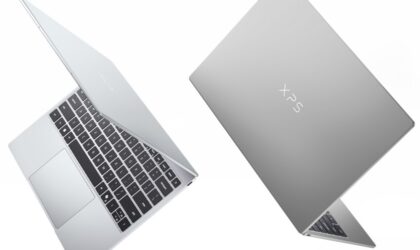
If you care most about how a laptop looks, feels, and displays—and especially if you’re a student—the Dell XPS 13 is the one. For $599 (student) or $699, you get the nicest build here and a gorgeous 2.5K touch display covering 100% of DCI-P3.
It starts with Intel Core Series 3 processors (Core Ultra Series 3 coming later), 8 GB of RAM (up to 32 GB), and 512 GB of storage (up to 1 TB). That 2.5K touch display uses a variable refresh rate that swings between 30 Hz and 120 Hz to save battery, and at 12.7 mm thin and 1 kg, it’s the thinnest, lightest XPS Dell has ever made. The aluminum chassis comes in Sky and Storm, and you also get a backlit keyboard, two USB-C 3.2 Gen 2 ports, Intel Wi-Fi 7, Windows Hello, quad speakers, dual-fan cooling, and up to 17 hours of streaming battery.
The catches: no headphone jack (a bummer), and it’s not clear whether an adapter comes in the box. Base RAM is 8 GB, and it comes with a traditional touchpad. The base model arrives in June 2026.
Who it’s for: students and young professionals who want a premium-feeling Windows laptop with the best screen of the three.
The quick decision
Live in macOS and mostly do light work? The MacBook Neo is your pick—perfect for writing, browsing, and everyday stuff without overcomplicating things.
Windows user who wants the most features for the money? Go Acer Swift Air 14. It leans into everyday flexibility over raw power, and that’s exactly what most people need.
Student who wants the best display and build—and can grab student pricing? The Dell XPS 13 wins. It’s all about premium feel, sharp visuals, and easy portability.
What to skip
Budget shoppers tend to make the same handful of mistakes. Here’s what to dodge.
Don’t buy a Windows laptop under $300. These are slow and plasticky, usually stuck with weak Pentium or Celeron chips that buckle under a single app. A cheap Chromebook is honestly the smarter buy at that price.
Don’t obsess over storage size while ignoring the screen. A 1 TB drive paired with a dim, washed-out TN panel is a bad trade. The display is the part you look at constantly—go for an IPS or better panel with decent brightness over a big storage number.
Don’t buy from sketchy third-party sellers. Stick to major retailers or the manufacturer with clear return policies. Then actually put the laptop through its paces during the return window, so you can send it back if anything feels off.
Don’t assume cheap means disposable—but go in clear-eyed. Budget laptops can serve you really well, but a lot of them won’t last as long as pricier machines. Buy knowing that, so it’s not a surprise down the road.
Quick-start advice
Before you buy, do one quick check:
1. Settle on your operating system first.
2. Confirm your student discount eligibility (if you qualify). If you’re a student—16+ for the XPS 13, or eligible for Apple education pricing—both prices drop:
- Dell XPS 13: $599
- MacBook Neo: $499
Lock in eligibility before you start comparing machines.
3. Then match the device to how you actually work.
Follow that order, and you’ll save money—and dodge a return later. Happy shopping!